
DINO NET
[Unity] 2D 게임 Title, Quit button, Scene 전환 본문
QuitButton.cs
using System.Collections;
using System.Collections.Generic;
using UnityEngine;
using UnityEngine.UI;

public class QuitButton : MonoBehaviour
{
    // Start is called before the first frame update
    void Start()
    {
        Button button = GetComponent<Button>();
        button.onClick.AddListener(ExitGame);
    }
    void Update()
    {
        if (Input.GetKeyDown(KeyCode.Escape))
        {
            ExitGame();
        }
    }

    public void ExitGame()
    {
#if UNITY_EDITOR
        UnityEditor.EditorApplication.isPlaying = false;
#else
        Application.Quit();
#endif
    }
}
(unity editor의 경우에는 Application.Quit()으로 종료되지 않으므로 EditorApplication.isPlaying = false로 만들어놓는다.)
StartButton.cs
using System.Collections;
using System.Collections.Generic;
using UnityEngine;
using UnityEngine.SceneManagement;
using UnityEngine.UI;

public class StartButton : MonoBehaviour
{
    // Start is called before the first frame update
    void Start()
    {
        Button button = GetComponent<Button>();
        button.onClick.AddListener(LoadMainScene);
    }

    // Update is called once per frame
    void Update()
    {
    }

    public void LoadMainScene()
    {
        SceneManager.LoadScene(0);
    }
}
onClick event를 script 상에서 넘어갈 수 있도록 script를 만들었다.
넘어갈 Scene은 Build Setting에 등록되어있어야 한다.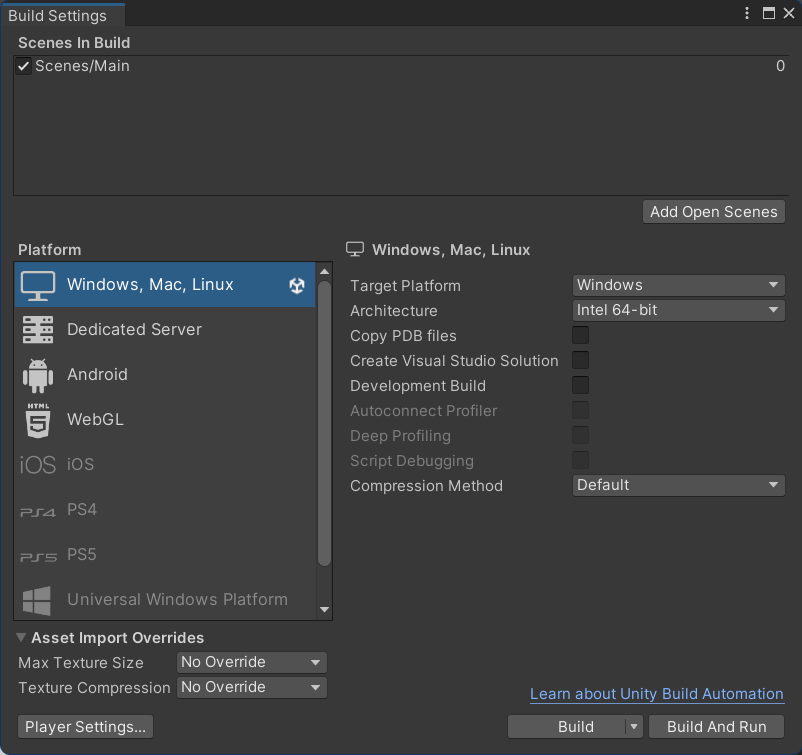
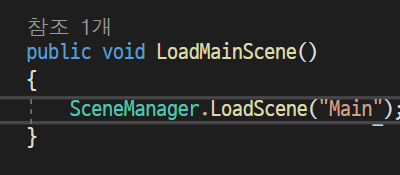
LoadScene에는 StartButton.cs처럼 Build Setting에 등록되어 있는 index 값을 적거나, 위 사진처럼 scene 이름을 적을 수도 있다. 하지만 문자열 자체가 먹는 메모리 데이터 값이 존재하므로 index 값을 적는 것이 좋다.
'program() > Unity' 카테고리의 다른 글
| [Unity] FPS 코드 백업 (1) | 2023.10.12 |
|---|